Definition
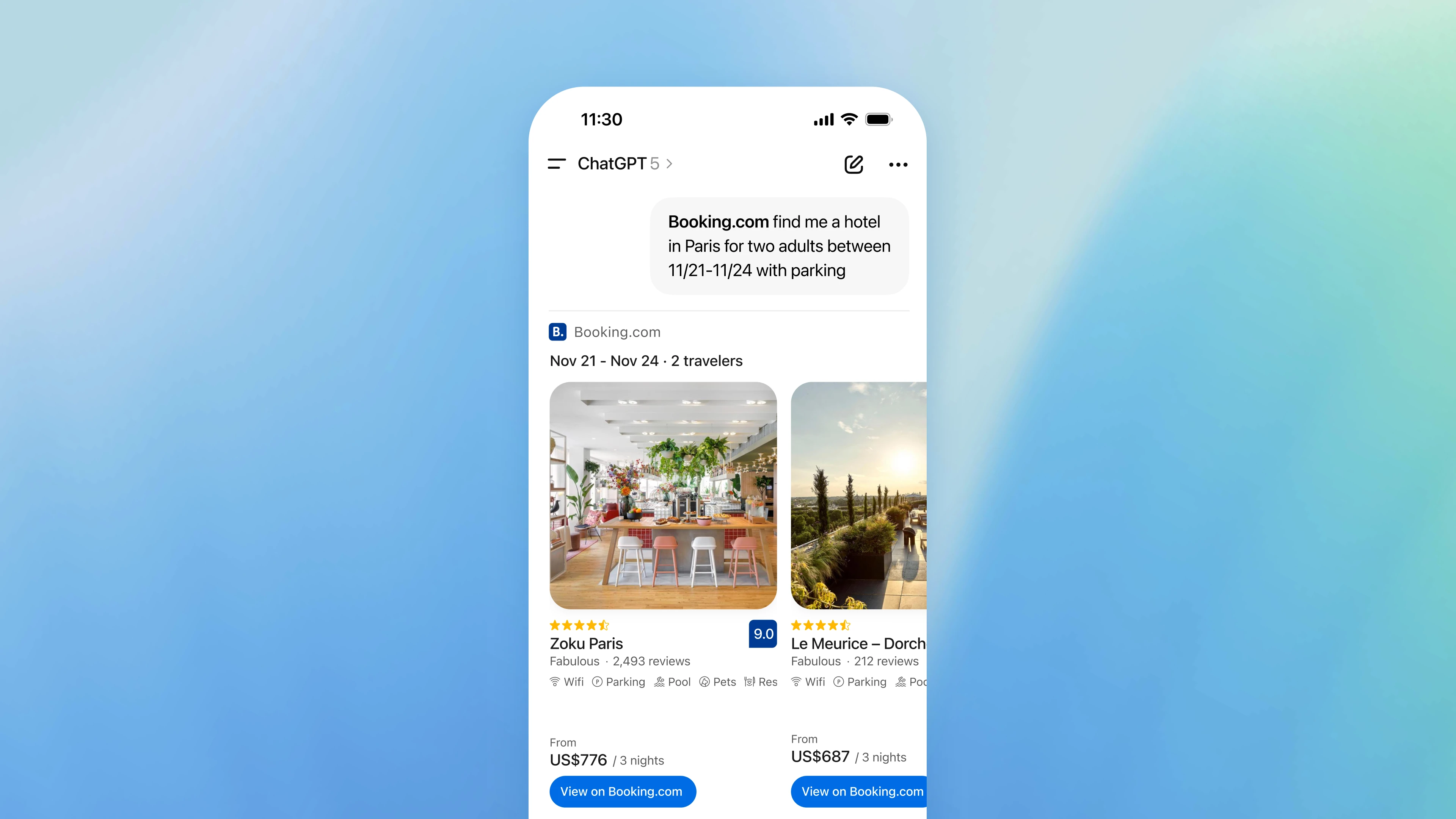
A ChatGPT app is a third party built extension that lives inside ChatGPT and connects the AI assistant to external services, data, and interactive tools. Unlike built-in ChatGPT features, these apps allow businesses to create custom experiences that integrate their own APIs, databases, and business logic directly into conversational workflows. When a user asks ChatGPT a question that relates to your app's capabilities, the AI can automatically invoke your tools and display rich, interactive interfaces—all without the user leaving the conversation.
Don’t let the term “app” anchor you in thinking this is a similar complexity to building an iOS or Android mobile app. Think of ChatGPT apps like mini-applications that pop up within your chat with the AI assistant. They are more similar to an embedded iframe on a website, than a complete mobile app.
Understanding ChatGPT Apps: The Fundamentals
How ChatGPT Apps Work
To understand what makes ChatGPT apps unique, let's break down how they function using a simple input-output model:
The Basic Flow:
User sends a message in ChatGPT
↓
ChatGPT understands the intent
↓
ChatGPT decides which app can help
↓
ChatGPT suggests app to the user
↓
User opts-in to use app
↓
App receives structured request
↓
App processes logic (calculations, database queries, API calls)
↓
App returns results + visual interface
↓
User sees response in chat + interactive widget
Let's walk through a real-world example. Imagine you run a real estate closing cost calculator app. Here's what happens:
- User asks: "What are the closing costs for a $500,000 home in Toronto?"
- ChatGPT interprets: The AI recognizes this as a question about real estate costs in a specific location and identifies that your closing cost calculator app can provide an answer.
- ChatGPT suggests & user invokes: ChatGPT suggests your ‘real estate closer app’ in the conversation and the user invokes the app.
- App receives structured data: Instead of receiving the raw text, your app gets clean, structured information like {purchase_price: 500000, city: "Toronto", province: "Ontario"}.
- App processes: Your backend calculates land transfer taxes, legal fees, title insurance, and other region-specific costs based on Ontario regulations.
- App responds with two things:
- Conversational text: "For a $500,000 home in Toronto, your estimated closing costs are approximately $16,500."
- Interactive widget: A detailed breakdown showing each cost component, with the ability to adjust assumptions or compare different scenarios.
- User experiences: They see both the AI's conversational response and your custom interface, making it easy to understand and explore the results without leaving ChatGPT.
- Next steps: After the user receives their personalized result, there can be a CTA to continue proceeding with the closing process with your business via an external URL.
The Three Core Components
Every ChatGPT app is built on three fundamental pieces:
1. The MCP Server
This is your app's communication hub. Built using the Model Context Protocol (MCP), it's a server that listens for requests from ChatGPT and responds with the information or actions the AI requests. Think of it as a translator that speaks both ChatGPT's language and your business system's language.
Your MCP server handles tasks like:
- Registering what your app can do (listing available "tools")
- Receiving structured requests from ChatGPT
- Executing business logic or querying your databases
- Formatting responses in ways ChatGPT can understand
- Serving up the visual interfaces users will see
2. The Tools
Tools are the specific actions your app can perform. Each tool represents a specific capability with a clear input and output. For example, credit coaching app might offer tools like:
- get_latest_credit_score - Retrieves your latest credit score
- get_credit_recommendations - Provides personalized credit recommendations
- update_credit_profile - Add or removes user submitted credit information
- generate_report - Creates a personalized credit report
Tools are where you define what data you need from users and what you'll give back. They're designed with clear schemas that help ChatGPT understand when to use them and what information to collect from the conversation.
3. The Widgets
Widgets are the interactive visual components that appear in the chat interface. While ChatGPT provides the conversational layer, widgets give you full control over how information is displayed and how users interact with your data.
Widgets can be:
- Simple displays: Cards showing summarized information, like menu items or stock price
- Data visualizations: Charts, graphs, or maps that make complex information digestible
- Interactive forms: Input fields where users can refine their queries or provide additional details
- Full applications: Rich interfaces for tasks like navigation, profile management or support.
These widgets run as HTML, CSS, and JavaScript inside a secure sandbox within ChatGPT, giving you the flexibility to create almost any user experience within the OpenAI guidelines while maintaining security and privacy.
ChatGPT Apps Explained: Why They Matter for Business
The Strategic Value Proposition
ChatGPT apps represent a fundamental shift in how businesses can reach and serve customers. Here's why they matter:
1. Meet Customers Where They Already Are
Tens of millions of people now start their day by opening ChatGPT. Instead of building yet another app they need to download, a website they need to discover, or a process they need to learn, you can embed your service directly into a tool they're already using daily.
Let’s look at the current customer journey for a service like a drain repair:
- Google "drain repair near by"
- Click through search results
- Navigate to a specific site
- Create an account, fill out forms or contact us
- Wait for results or call
- Repeat across multiple businesses
With a ChatGPT app, the journey becomes:
- Ask ChatGPT: "My drain is blocked, I need a repair service asap"
- ChatGPT provides an initial response and app suggestion
- User invokes app (ex: Drain Pro NY)
- User can look at availability, pricing and book right in ChatGPT
2. Leverage AI-Powered Discovery
Unlike traditional app stores where users must actively search for your solution, ChatGPT apps benefit from AI-powered discovery. The model automatically recognizes when your app is relevant to a user's question and surfaces it intelligently.
This means users don't need to know your app exists beforehand. If they're asking questions your app can answer, ChatGPT will find you for them. This fundamentally changes the user acquisition game. A brand new distribution channel with over 800 million weekly active users is about to unlock.
3. Combine Conversation with Interaction
The magic of ChatGPT apps lies in blending natural language with structured interfaces. Users can:
- Ask questions naturally without knowing the "right" keywords
- See results in visual, interactive formats
- Refine queries through conversation
- Take actions through forms or buttons
This hybrid approach means you're not limited to either pure conversation or traditional UI. You get the best of both worlds.
Real Business Use Cases
ChatGPT apps work exceptionally well for specific types of business needs:
Top-of-Funnel Lead Generation
Apps excel at capturing potential customers at the awareness and consideration stages. A real estate company might build a property affordability calculator that helps users understand what they can afford, naturally leading to mortgage consultation bookings. An estate planning service might offer a needs assessment that identifies gaps in someone's legal documents, creating qualified leads for their lawyers.
Instant Utility Tools
Services that provide immediate, calculable value see strong adoption. Think closing cost estimators, coverage checkers for insurance, shipping calculators, tax obligation estimators, or salary benchmarking tools. These solve real pain points with your brand right inside ChatGPT.
Data Discovery and Exploration
If your business involves helping users find relevant information from complex datasets, a ChatGPT app can really thrive. Healthcare navigation tools can help patients understand coverage across regional programs. Marketplaces can match user needs to the right providers. Research tools can surface insights from proprietary databases.
Qualification and Assessment
Apps that help users understand their needs or eligibility for services work particularly well. Financial advisors can offer retirement readiness assessments. Healthcare services can provide symptom checkers. Legal services can evaluate document needs based on life circumstances.
How Do ChatGPT Apps Work?
The Discovery Mechanism
One of the most important aspects of ChatGPT apps is how users find them. Unlike traditional software where discovery happens through app stores or search engines, ChatGPT apps use intent-based discovery powered by AI.
Model-Driven Selection
When a user types a message, ChatGPT analyzes the intent, context, and content to determine if any available apps could help answer the question. The model considers:
- Direct mentions: If a user says "Use the [Brand Name] app," that app is prioritized
- Semantic matching: The model matches the user's question to tool descriptions, looking for capability alignment
- Conversation history: Previous messages in the thread provide context about what the user is trying to accomplish
- Past usage: If a user has successfully used your app before, ChatGPT is more likely to suggest it again for similar queries
This means your app's discoverability depends heavily on how well you've described its capabilities in your tool metadata. Clear, specific descriptions using natural language that matches how users think about problems will dramatically improve your app's activation rate. This is a rapidly evolving space, so this criteria is likely to expand and take into consideration many other factors. For example, if your business is already being cited by ChatGPT in the response and you have an associated app that would be a positive signal for discoverability.
User Control
Users maintain full control over which apps they want to use. They can:
- Explicitly link apps they trust
- See which apps ChatGPT wants to activate before it happens
- Approve or deny app usage
- Unlink apps at any time
- Configure privacy settings per app
This builds trust but also means your app needs to clearly communicate its value proposition quickly when users first encounter it.
The State Management Challenge
Unlike traditional applications where you control the entire user session, ChatGPT apps operate in a more ephemeral environment. Understanding how state works is crucial for designing effective apps.
Within-Conversation State
During a single conversation, your app can maintain state across multiple tool calls. When you return a widget with data, ChatGPT can invoke your tools again with context from previous interactions. For example:
- User asks to see their project status
- Your app shows a project dashboard widget
- User clicks "Mark task as complete" in the widget
- Your app receives the request with context about which project is currently displayed
- Your app updates the task and returns an updated widget
This works because widgets can trigger new tool calls and maintain continuity within the conversation.
Cross-Conversation Persistence
Between conversations, however, things work differently. ChatGPT apps are designed with privacy in mind, so by default, conversation history and context don't automatically carry over to new chats.
If your app needs to provide personalized experiences across sessions, you have two options:
- User authentication: Implement OAuth 2.1 authentication so users can link their accounts. This allows your backend to recognize returning users and provide personalized data.
- Explicit user input: Design your tools to request necessary context. For example, rather than assuming you know which project a user wants to work with, ask them to specify it each time.
Many successful ChatGPT apps operate entirely anonymously, collecting only the minimum information needed for each interaction and not storing any user data at all.
What Can a ChatGPT App Do?
The possibilities for ChatGPT apps are broad, but the most successful apps share common characteristics: they provide clear, immediate value and fit naturally into conversational workflows.
Read-Only Information Access
Many apps focus on surfacing information from external sources. These can:
- Query databases: Retrieve catalogs, knowledge bases, or proprietary datasets
- Pull real-time data: Get prices, estimates, sports scores, or system statuses
- Generate reports: Compile analytics, summaries, or visualizations from backend systems
- Search and retrieve: Find relevant documents, records, or references
Read-only apps are simpler to build and require less stringent security controls since they're not making changes to data.
Calculations and Assessments
Apps excel at processing user inputs through complex business logic:
- Financial calculations: Mortgage payments, investment returns, tax implications, or budget planning
- Eligibility checks: Determining qualification for programs, benefits, or services based on rules
- Needs assessments: Evaluating user situations to recommend products, services, or actions
- Risk analysis: Processing data to provide risk scores, probability assessments, or recommendations
These apps often combine conversational data gathering with structured forms for precision, letting users provide information naturally and then refine it through interactive interfaces.
Interactive Workflows
More sophisticated apps guide users through multi-step processes:
- Form completion: Collecting information across several stages with validation and guidance
- Configuration tools: Helping users customize products, services, or settings
- Comparison engines: Evaluating multiple options based on user-defined criteria
- Planning assistants: Creating schedules, budgets, or strategies collaboratively
These apps feel more like current software applications but benefit from conversational context and natural language flexibility.
Action and Transaction Execution
Apps can perform write operations and trigger real-world actions:
- Creating records: Adding tasks to project management systems, appointments to calendars, or items to shopping lists
- Updating data: Changing status, updating a profile, or cancelling a service
- Processing transactions: Initiating payments, booking an appointment, or orders
- Triggering workflows: Starting approval processes, sending notifications, or generating documents
Write operations require more careful design, including user confirmation prompts, authentication when appropriate, and clear feedback about what actions were taken.
Hybrid Approaches
The most powerful apps combine multiple capabilities. For example, a property transaction app might:
- Calculate estimated closing costs based on user inputs
- Display a breakdown in an interactive widget
- Allow users to adjust assumptions through a form
- Collect contact details for follow-up
- Create an inquiry record in the business's CRM
- Hand off the user to the full website for detailed consultation
ChatGPT App for your business: Strategic Considerations
When ChatGPT Apps Make Sense
Not every business need warrants a ChatGPT app right now. The sweet spot lies in specific scenarios matched to your audience.
You Should Build a ChatGPT App If:
Your service solves a discrete, immediate problem that users might ask about naturally. Apps work best when they address pain points users can articulate conversationally, like "How much will I owe in property transfer tax?" or "find me drop-in morning HIIT classes near me"
Your goal is user acquisition rather than transaction completion. ChatGPT apps excel as top-of-funnel discovery tools. They're perfect for capturing qualified leads, providing initial value to build trust, and creating pathways to your full service. They're less suited right now for complex, multi-step transactions that require extensive back-and-forth (this will rapidly evolve). Your value proposition is easy to demonstrate quickly. If you can show meaningful results in a few interactions, an app makes sense. Long sales cycles or services requiring extensive consultation may need different approaches.
Your service benefits from AI-powered discovery. If users don't know specialized terms or might not think to search for your solution directly, ChatGPT's contextual app invocation can surface your offering to the right people at the right time.
You Might Not Need a ChatGPT App Right Now If:
Your service requires extensive, authenticated sessions with complex state management. While apps can implement authentication, they work best with lightweight interactions rather than deep, persistent sessions.
Your competitive advantage relies on controlling the entire user experience. If your differentiation comes from a specific, branded interface and you need tight control over every interaction, an embedded app might feel constraining.
Your service is too niche or your target audience doesn't overlap with ChatGPT's user base. While ChatGPT has broad adoption, if your users are unlikely to be daily ChatGPT users, other channels might provide better reach.
Data Collection and Privacy Strategy
One of the most important design decisions for ChatGPT apps revolves around data: what to collect, when to collect it, and how to handle it.
The Least Privilege Principle
OpenAI requires apps to follow a "least privilege" approach to data collection. This means you should only request information that's absolutely necessary for your app to function in the current moment.
For example, if you're building an app for a restaurant chain, you need the user’s general location to show them locations nearby and menus, you don't need email or phone number yet. Those contact details should only be collected if the user explicitly chooses to proceed with ordering food.
This principle benefits both users and developers. Users feel safer engaging with apps that don't demand personal information upfront. Developers avoid the complexity and liability of storing unnecessary data.
Authentication: When It's Required
Many successful ChatGPT apps operate entirely anonymously, requiring no user authentication whatsoever. However, authentication becomes necessary in specific scenarios:
- Exposing customer-specific data: If your app needs to show someone their personal account information, orders, or records, authentication is required to verify identity
- Write actions on user accounts: Creating, modifying, or deleting data associated with a specific user requires authentication
- Rate limiting and abuse prevention: For apps that access expensive APIs or limited resources, authentication helps prevent abuse
If your app provides generic calculations, public information lookup, or universal tools, you can and should operate without authentication. This reduces friction dramatically and increases conversion.
The Strategic Handoff
Smart ChatGPT apps don't try to do everything within the chat interface. Instead, they provide enough value to build trust and demonstrate capability, then hand off to your full website or application for deeper engagement.
For instance, a wellness studio app can provide a class schedule within ChatGPT, then provide a clear call-to-action: "Ready to book? Complete your booking on our website.” The link takes users to the studio’s scheduling system where they book and pay for the class.
This approach plays to the strengths of each platform. ChatGPT handles discovery, initial engagement, and education. Your full website handles conversion, detailed workflows, and relationship building.
FAQs: Common Questions About ChatGPT Apps
What Makes ChatGPT Apps Different from GPTs?
This is one of the most frequently asked questions, and the distinction is important for understanding what you're building.
Custom GPTs are configured versions of ChatGPT with custom instructions and knowledge. They're essentially specialized AI assistants with tailored personalities, expertise, and information. GPTs can:
- Have custom system prompts that shape their personality and approach
- Access uploaded files and documents as knowledge bases
- Use built-in tools like web browsing, DALL-E, and code execution
- Be shared publicly or kept private
However, GPTs are limited to what ChatGPT can natively do. They can't connect to external APIs, access real-time databases, or create custom user interfaces.
ChatGPT apps, by contrast, are full-fledged integrations that extend ChatGPT's capabilities by connecting it to external systems. Apps can:
- Connect to your APIs and databases
- Execute custom business logic
- Display interactive, branded interfaces
- Perform actions in external systems
- Require authentication for personalized experiences
- Charge for usage or transactions
Think of GPTs as specialized versions of ChatGPT itself, while apps are external services that ChatGPT can invoke on your behalf. GPTs are great for knowledge work and specialized advice. Apps are great for discoverability, transactions, tool access, and business process integration.
Are ChatGPT Apps Only for Developers?
Short answer: No, but you'll need developer resources or a dedicated platform to build one.
Building a ChatGPT app does require technical expertise. You need developers who understand:
- Backend server development (Python, Node.js, or similar)
- API design and implementation
- Frontend web development (HTML, CSS, JavaScript)
- The Model Context Protocol specification
- Authentication and security best practices
However, you don't need to be a large tech company or have a massive engineering team. Many successful ChatGPT apps have been built by small teams or even individual developers.
What you definitely need is clarity about your use case, value proposition, and user experience. The most important work happens before any code is written: understanding what problem you're solving, how users will discover your app, and what success looks like. ChatGPT Apps, and the AppsSDK are also rapidly evolving, so staying on top of new capabilities, releases, and guidelines is critical to maintain a leading app.
Many businesses approach this by:
- Internal development: If you have engineering resources, they can build the app directly
- Agency or freelancers: Many agencies and independent developers now specialize in ChatGPT app development
- Platform: SaaS platforms like Courtyard, give your business one place to build, manage and optimize your ChatGPT app using best practices and templates to get to market fast.
What Can ChatGPT Apps Do for Businesses?
ChatGPT apps create value for businesses across several dimensions:
Customer Acquisition
Apps serve as powerful lead generation tools. By providing immediate utility without requiring upfront commitment, apps attract potential customers at the awareness stage and convert them to qualified leads. A medical savings app that assesses someone's current situation and identifies rebates creates a natural transition to prescription management.
The AI-powered discovery mechanism also means you're reaching people who have relevant needs but might not have found you through traditional marketing channels. You're being surfaced to users based on their actual questions and needs, not just keyword matching.
Brand Presence in AI Interfaces
As more users incorporate ChatGPT into their daily workflows, having your business represented as an app ensures you maintain visibility in this emerging interface paradigm. When someone asks a question your app can answer, your brand appears alongside the AI's response.
This is particularly valuable in competitive markets. If your competitor builds an app and you don't, users asking questions in your domain may consistently see their brand instead of yours.
Process Efficiency
For businesses with customer service or sales teams, ChatGPT apps can handle common queries and qualifications automatically. Instead of prospects calling or emailing with basic questions, they can get immediate answers through your app. This frees your team to focus on higher-value interactions with qualified leads.
Data and Insights
Apps provide visibility into what questions users are asking and how they're thinking about your domain. The prompts that trigger your app, the tools they invoke, and the paths they take through your workflows all provide valuable market intelligence about customer needs and pain points.
Competitive Differentiation
In many industries, ChatGPT apps are still novel. Being an early mover can establish your brand as innovative and customer-centric. The utility you provide through your app can become a differentiator in crowded markets where traditional marketing struggles to break through.
Are ChatGPT Apps Safe?
Security and privacy are fundamental to the ChatGPT apps ecosystem. Multiple layers of protection ensure apps operate safely:
Sandboxed Execution
Widgets run in isolated environments that prevent them from accessing sensitive data, tracking users across sites, or interfering with ChatGPT's functionality.
Explicit User Consent
Users must actively link or invoke apps before they can be used. When ChatGPT suggests using an app for the first time, users see a clear explanation of what the app does and must approve the connection. Users can review their linked apps at any time and remove any they no longer trust.
Data Minimization Requirements
OpenAI requires apps to follow the least privilege principle for data collection. Apps should only request information they actually need, and users should understand why each piece of data is necessary. Authentication is only required when truly needed for functionality.
Developer Verification
Apps undergo review before being made available publicly. OpenAI evaluates apps for compliance with privacy guidelines, security best practices, and appropriate behavior. Developers must provide privacy policies and support contacts.
Secure Communication
All communication between ChatGPT and apps happens over encrypted HTTPS connections. Apps cannot intercept conversations or access data from other apps.
Prompt Injection Defense
Apps are designed with awareness that users might attempt to manipulate the AI's behavior through carefully crafted prompts. Well-built apps validate all inputs, never execute arbitrary code, and maintain clear boundaries between user input and system commands.
User Control
Users maintain complete control over their data and app permissions. They can:
- See which apps have been invoked in each conversation
- Unlink apps at any time
- Report apps that behave inappropriately
- Control whether apps can be suggested automatically
From a business perspective, building a secure app protects both your users and your reputation. Following OpenAI's security guidelines isn't just about compliance, it's about building trust with users who will become your customers.
Getting Started: What Business Leaders Should Know
The Strategic Decision Framework
Before committing to building a ChatGPT app, work through these questions:
1. What specific problem are we solving?
Define the exact user pain point your app addresses. Vague concepts like "helping with real estate" won't work. Specific problems like "calculating estimated closing costs for California home purchases" are perfect.
2. How does this fit our customer journey?
Map where the app sits in your acquisition funnel. Is it awareness, consideration, or conversion? What happens before users encounter your app? What happens after they interact with it?
3. What's the minimum viable interaction?
ChatGPT apps should provide value in one to three exchanges. If your service requires ten back-and-forth interactions, you might need to simplify or split it into multiple tools.
4. What data do we actually need?
List only the information required to provide the core value. Anything beyond that should be optional or collected after demonstrating utility.
5. Where's the handoff point?
Identify the natural transition from ChatGPT to your full platform. Where does the app end and your website, booking system, or sales process begin?
6. How will users discover this?
List the natural language queries that should trigger your app. If you can't articulate five to ten ways users might phrase relevant questions, your use case might be too narrow or obscure.
Conclusion: The Future of ChatGPT Apps
ChatGPT apps represent a fundamental shift in how businesses can deliver services to customers. By embedding directly into conversational AI interfaces that millions of people use daily, apps eliminate traditional barriers to discovery and engagement.
The apps ecosystem is still young, which presents significant opportunity for early movers. As AI assistants become more central to how people work and make decisions, having your business represented through a well-designed app will transition from advantage to necessity.
The businesses that will thrive in this ecosystem are those that:
- Focus on providing genuine, immediate value rather than trying to capture as much user data as possible
- Design for the specific constraints and opportunities of conversational interfaces rather than trying to replicate traditional app experiences
- Build trust through transparency and security rather than lock-in and forced authentication
- Understand that apps are about discovery and initial engagement, not complete transaction capture
- Iterate based on real user behavior rather than assumptions about how people will interact with AI
If you're a business owner, product manager, or marketer wondering whether ChatGPT apps fit into your strategy, start by asking what questions your potential customers are already asking ChatGPT. If your service provides clear answers to those questions, an app might be your best path to reaching them.